If you have worked with Node.js APIs or backend services, chances are you’ve seen this frustrating error at least once:
Error: read ECONNRESET (Node.js ECONNRESET error)
I clearly remember the first time I encountered it. I was working on a Node.js backend that was calling a third-party API. Everything worked fine locally, but suddenly in production, requests started failing randomly. Logs were full of ECONNRESET, and at first, it made absolutely no sense.
After debugging it multiple times across different projects, I realized this error is common, misunderstood, and very fixable, once you understand what’s actually happening.
Let’s break it down properly.
What Is the Node.js ECONNRESET Error?
This error means that an existing network connection was forcibly closed by the other side.
In simple terms:
- Your Node.js app was sending or receiving data
- The remote server closed the connection unexpectedly
- Node.js throws
ECONNRESETbecause it can’t continue using that socket

This is why it’s often described as:
“Connection reset by peer”
It’s not always your fault, and that’s important to understand.
Common Scenarios Where Node.js ECONNRESET Error Occurs
From real-world experience, this error usually appears in these cases:
1. API Requests to External Services
If you’re using:
- Axios
- Fetch
- Request
- HTTP / HTTPS module
…and the external API:
- Times out
- Crashes
- Rejects long-running connections
You may see Node.js ECONNRESET Error.
2. High Traffic or Load Spikes – Node.js ECONNRESET Error
When your Node.js server:
- Receives too many requests
- Runs out of memory
- Becomes unresponsive
The operating system or load balancer may reset connections.
3. Timeout Mismatch
This is a very common cause.
For example:
- Client timeout: 30 seconds
- Server timeout: 10 seconds
If the server closes the connection before the client finishes reading, server throws Node.js ECONNRESET error.
4. Reverse Proxy or Load Balancer Issues – Node.js ECONNRESET Error
If you’re using:
- Nginx
- AWS ALB
- Cloudflare
Improper timeout or buffer settings can easily cause connection resets.
Misconfigured reverse proxies can also lead to upstream failures and gateway errors. If you’re using Nginx, this guide explains how to fix the 502 Bad Gateway error on Nginx, which is often related to backend connection resets like ECONNRESET.
How ECONNRESET Looks in Code

Typical error messages:
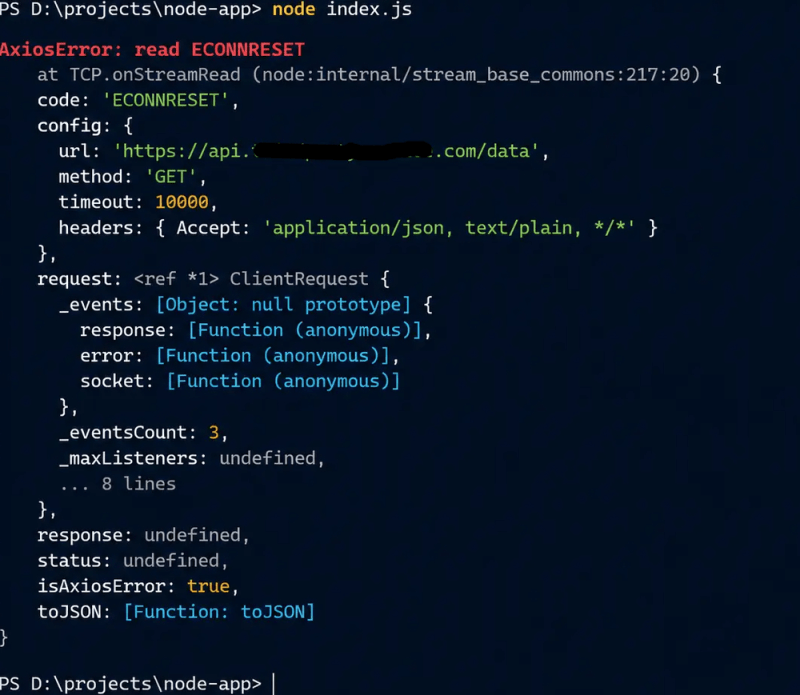
Error: read ECONNRESET
Error: socket hang up
Error: write ECONNRESET
In Axios:
AxiosError: read ECONNRESETIn Node logs:
Why This Error Is So Confusing
What makes ECONNRESET difficult is that:
- It doesn’t always happen consistently
- It may appear only in production
- Restarting the server sometimes “fixes” it temporarily
I’ve personally spent hours debugging code that wasn’t even the real problem, the issue was infrastructure or timeouts.
How to Fix Node.js ECONNRESET Error
Let’s go through practical solutions that actually work.
Increase Client Timeout (Most Common Fix)
When making API calls, always define a timeout.

Axios example:
axios.get(url, {
  timeout: 15000 // 15 seconds
});
If you don’t set this, Node may keep waiting while the server has already closed the connection.
Handle Node.js ECONNRESET Error Gracefully (Very Important)
Never let this error crash your app.
process.on('uncaughtException', (err) => {
  if (err.code === 'ECONNRESET') {
    console.error('Connection reset handled safely');
  } else {
    throw err;
  }
});
This won’t fix the root cause, but it prevents downtime.
Increase Server Timeout in Node.js
If your own API is slow, Node might close the connection early.
server.setTimeout(30000); // 30 secondsFor Express:
app.use((req, res, next) => {
req.setTimeout(30000);
res.setTimeout(30000);
next();
});
Fix Nginx / Proxy Timeout Settings
If you’re behind Nginx, this is critical.
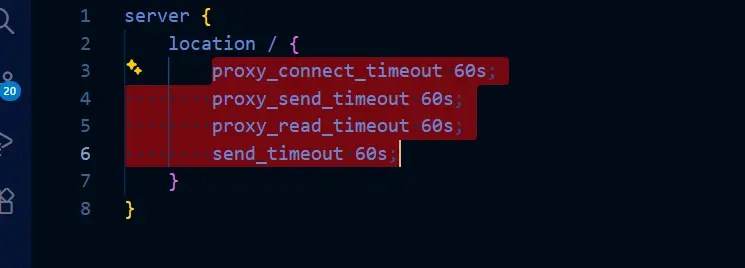
proxy_connect_timeout 60s;
proxy_send_timeout 60s;
proxy_read_timeout 60s;
send_timeout 60s;
Many ECONNRESET issues magically disappear after this.
Add Retry Logic for External API Calls – Node.js ECONNRESET Error
Since the issue often comes from external services, retries help a lot.
axiosRetry(axios, {
  retries: 3,
  retryDelay: axiosRetry.exponentialDelay
});
This is especially useful for:
- Payment APIs
- Email services
- Analytics APIs
Check Memory & CPU Usage
In one project, I discovered this error was happening because:
- Node.js was running out of memory
- The process became unresponsive
- Connections were dropped
Fix:
node --max-old-space-size=4096 app.jsAlso monitor:
- CPU spikes
- Event loop lag
Memory exhaustion is one of the most common causes of connection resets. You can follow this guide to fix the JavaScript heap out of memory error in Node.js to improve stability.
Avoid Long-Running Requests
If your API does heavy processing:
- Move work to background jobs
- Use queues (Bull, RabbitMQ)
- Respond early and process async
Long requests are ECONNRESET magnets.
Real Example From My Experience – Node.js ECONNRESET Error
I was working on a Node.js service that fetched reports from a third-party analytics API.
During peak hours, requests failed randomly with this error.
The root cause?
- API response time increased
- Axios default timeout was too low
- Load balancer closed idle connections
Fixing timeouts + adding retries solved it completely.
Is ECONNRESET a Bug in Node.js?
No.
It’s a network-level error, not a Node.js bug.
Node.js is just informing you that the connection was closed unexpectedly.
How to Prevent ECONNRESET in the Future
Best practices:
- Always define timeouts
- Use retries for external calls
- Monitor memory and CPU
- Tune proxy and load balancer settings
- Never assume external APIs are always stable
If your Node.js process consumes excessive memory, it can become unstable and drop connections. This guide explains how to diagnose and fix Node.js high memory usage in production.
Final Thoughts – Node.js ECONNRESET Error
The Node.js ECONNRESET error looks scary, especially when it shows up in production.
But once you understand that it’s usually about timeouts, load, or external services, fixing it becomes straightforward.
I’ve seen this error across multiple real projects and every time, the solution was better handling, better configuration, not rewriting code.
If you’re facing this issue, go step by step. One of the fixes above will work.
FAQs: Node.js ECONNRESET Error
What does the ECONNRESET error mean in Node.js?
This error means that a network connection was suddenly closed by the server you were communicating with. In simple terms, your Node.js application was still sending or receiving data, but the remote server decided to end the connection unexpectedly.
Why does the ECONNRESET error appear randomly in production?
This error often shows up in production because real traffic introduces factors like higher load, slower response times, unstable third-party APIs, or strict timeout limits on load balancers. Since local environments usually don’t face these conditions, the issue feels random and hard to reproduce.
Is ECONNRESET a bug in Node.js?
No, This error is not a Node.js bug. It’s a standard network error that occurs when the other side of the connection resets it. Node.js simply reports the error so your application can handle it properly.
How can I reduce or prevent ECONNRESET errors?
You can minimize ECONNRESET errors by setting proper request timeouts, adding retry logic for external API calls, handling errors gracefully, and ensuring your server, proxies, and load balancers are configured with appropriate timeout values.
Does increasing the timeout always solve ECONNRESET?
Not always. While increasing timeouts helps in many cases, this error can also be caused by memory pressure, server crashes, or unreliable external services. In those situations, monitoring, optimization, and retries are just as important as timeout settings.

Ankit Kumar is a senior software engineer with 8+ years of experience working on production web applications using React, Angular, Node.js, SAP UI5, and JavaScript. He writes technical articles covering frontend, backend, and server-side topics, with a focus on real-world production issues and performance optimization.